Changelog

What's new, improved, and fixed in each release of Nexus.

v0.3.0

Latest

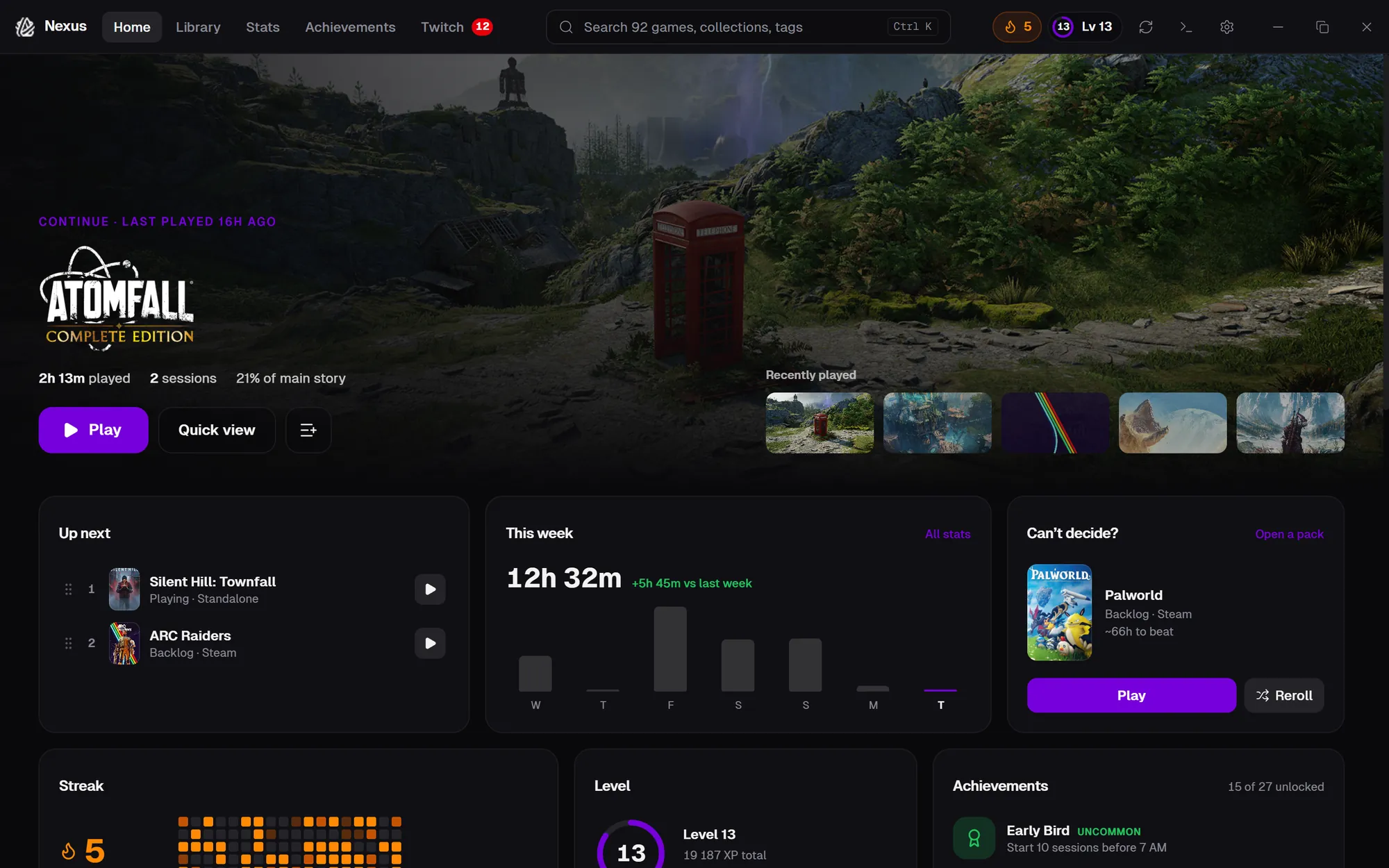
A major release focused on progression and motivation. Nexus now tracks your play streak, rewards milestones mid-session, gives every game a mastery tier, unlocks achievements as you play, levels up your profile with XP, and celebrates the games you retire with a full ceremony and shareable certificate.

New

  • Game retirement ceremony — When you mark a game as completed or dropped, Nexus plays a cinematic retirement ceremony with a hero card, play stats, and a final send-off. Generate a shareable certificate image for any retired game from its detail view.
  • XP and level system — Every play session, completion, and achievement earns XP. Watch your launcher-wide level climb with a progress bar in the sidebar and a dedicated profile view showing your tier, total XP, and recent level-ups.
  • Achievement system — Dozens of Nexus-native achievements unlock as you play, spanning play time, streaks, library curation, backlog conquests, and ceremony milestones. Track progress and unlock history from the new Achievements page.
  • Game mastery tiers — Each game now has a mastery tier (Novice → Adept → Veteran → Master → Legend) driven by your play time, completions, and ratings. Tiers show up on game cards and the detail overlay with a custom visual treatment.
  • Session milestones — Mid-session toasts celebrate in-the-moment achievements — first hour, longest session, streak extended, new personal best — without pulling you out of the game.
  • Play streak tracker — A current-streak counter in the sidebar tracks consecutive days played, with freeze protection, streak history, and a milestone celebration when you extend a long streak.

v0.2.1

Archive and Completed views — track game completions across your entire library, even after uninstalling. The Completed page gets a full Trophy Room redesign with stats, a spotlight hero, and entrance animations.

New

  • Archive view — Browse games that were uninstalled and removed by library sync. Right-click to mark as completed or view details.
  • Completed view (Trophy Room) — Dedicated page for all completed games with a stats banner (count, total play time, average rating, top genre), a spotlight hero for your most-played completion, and staggered card entrance animations.
  • Completed flag — New persistent completed field that survives uninstallation. Mark any game as completed and it stays tracked even after removal.
  • Stats click-through — Games in Library Stats and Wrapped views are now clickable, opening the detail overlay. Uninstalled games show a visual indicator.

Improved

  • Archived game detail — Play button disabled for uninstalled games; status toggle simplified to Completed / Not Completed.
  • Sidebar badges — Archive and Completed counts shown as badges in the sidebar navigation.

v0.2.0

Google Drive cloud backup — back up your entire Nexus library to Google Drive and restore it on any machine. Automatic scheduled backups with configurable frequency and retention.

New

  • Google Drive cloud backup — Link your Google account from Settings to back up your library database to Google Drive. Supports manual and automatic backups (daily or weekly) with configurable retention (how many backups to keep).
  • Restore from backup — Browse your cloud backups and restore any previous snapshot. Schema version checks prevent restoring a backup from a newer version of Nexus.
  • OAuth callback page — After authorizing with Google, the browser now shows a styled confirmation page matching the Nexus dark theme instead of a plain text response.

Improved

  • Settings sidebar — All accordion sections now start collapsed when opening Settings, giving a cleaner overview.

v0.1.21

HowLongToBeat integration fix and progress tracking improvements — HLTB data fetching works again after their API endpoint changed, and milestone drag-and-drop reordering is now reliable.

Fixed

  • HowLongToBeat integration restored — Updated the HLTB client to use the current /api/find endpoint with the new three-part authentication scheme (token + fingerprint pair). Auto-fetch, manual search, and refetch all work again.
  • Milestone drag-and-drop — Replaced the broken native HTML5 drag-and-drop in the progress milestones list with the same @dnd-kit library used by Play Queue and Collections. Reordering now works reliably in WebView2.

Improved

  • HLTB error messages — Manual search now shows a clear error message when HLTB is temporarily unavailable instead of silently returning empty results.
  • Milestone drag handle — Drag-and-drop is now initiated only from the grip handle, so clicking checkboxes and delete buttons no longer accidentally starts a drag.

v0.1.20

Edit game usability and session housekeeping — browse for files directly from the Edit Game modal, and bulk-delete short play sessions that clutter your stats.

New

  • File picker in Edit Game — Browse buttons next to Executable Path, Custom Cover Art, and Custom Hero Art fields open a native file dialog so you no longer need to paste paths manually.
  • Bulk delete short sessions — A new tool in Settings lets you find and remove play sessions shorter than a threshold you choose (seconds or minutes). Game stats are automatically recalculated after cleanup.

Fixed

  • Empty library "Open Settings" button — The Settings shortcut on the empty library screen now works correctly instead of doing nothing.

v0.1.19

Smart collection reliability and collection management improvements — smart collections now reactively refresh when game data changes, and you can remove games from collections via the context menu.

Improved

  • Reactive smart collection refresh — Smart collections now re-fetch from the backend whenever game data changes (status, rating, metadata, etc.), ensuring membership is always up to date instead of relying on frontend-only filtering.
  • Unified collection refresh — Replaced the separate smart collection refresh with a single refreshCollections function that re-fetches all collections, simplifying the data flow.

New

  • Remove from Collection — Right-click any game in a manual collection to remove it directly from the context menu.

Fixed

  • Smart collections in context menu — Smart collections are now filtered out of the "Add to Collection" context menu picker, since their membership is rule-based and can't be manually edited.

v0.1.18

Hardware branding and UI polish — your CPU and GPU brand logos now appear in the sidebar, GPU detection works on modern Windows without wmic, and the donate link moves to Settings.

New

  • Hardware detection backend — New get_system_hardware Tauri command detects CPU brand via sysinfo and GPU brand via WMI/PowerShell, with discrete-GPU preference for multi-GPU systems.
  • Hardware branding sidebar — CPU and GPU brand logos (Intel, AMD, NVIDIA) now display in the sidebar footer. Expanded mode shows logo + model name; collapsed mode shows icon-only with tooltips.

Improved

  • GPU detection fallback — When wmic is unavailable (removed in newer Windows builds), GPU detection falls back to PowerShell Get-CimInstance automatically.
  • Support link relocated — "Support this project" moved from the sidebar to the Settings > About section for a cleaner navigation experience.
  • Game card progress bar — Completion progress bar is now thicker and more visible with a dark background track.

v0.1.17

Twitch token resilience and website improvements — Twitch API calls now automatically recover from expired tokens with force-refresh and retry, and the website features section has been redesigned with categorised lists.

Improved

  • Twitch 401 auto-recovery — When a Twitch API call returns 401 (invalid token), Nexus now force-refreshes the access token and retries the request automatically. This covers followed channels, live streams, streams-by-game, and trending games — no more silent failures or stale data after token expiry.
  • Website feature section — The features section on the landing page has been redesigned with categorised feature lists grouped by Library Management, Tracking & Stats, Organisation, Integrations, and Experience.

Fixed

  • Trending games cache fallback — Deduplicated the trending-games cache fallback logic into a shared helper, fixing inconsistent stale-data handling across error paths.

v0.1.16

Smart Collections and Progress Tracking — build dynamic, auto-updating collections with a visual rules engine, and track your completion progress with milestones and HLTB integration.

Added

  • Smart Collections — Create dynamic collections that auto-populate based on rules. Build complex filters with a visual rules builder using AND/OR logic across status, source, genre, rating, play time, tags, and more.
  • Smart Collection Presets — Quick-start with built-in presets like "Quick Plays", "Forgotten Gems", "Recently Added", "Highly Rated Unplayed", and "Weekend Warriors". Customize them after creation.
  • Game Progress Tracking — Track completion percentage for any game with a visual progress bar on game cards and the detail overlay. Set progress manually or let it auto-calculate from milestones.
  • Milestones — Define custom milestones for each game (e.g. "Beat Act 1", "All side quests") and check them off as you go. Progress auto-updates based on milestone completion.
  • HLTB Time Remaining — See how much time you have left based on your actual play time vs HowLongToBeat estimates, right in the detail overlay.

Improved

  • Smart collection refresh — Smart collections update automatically whenever your library changes (resync, status update, rating change).
  • Progress bar on cards — A subtle progress bar appears at the bottom of game cards, colored by status. Toggle it in Library Preferences.

v0.1.15

Game Tags — organize your library with freeform, color-coded tags. Create, assign, filter, and manage tags across your entire collection.

Added

  • Game Tags — Create freeform tags (e.g. "couch co-op", "podcast game", "comfort game") and assign them to any game. Tags support custom colors from a 10-color palette.
  • Tag Management — Full tag CRUD in Settings: create, rename, recolor, and delete tags with game-count awareness.
  • Tag Display — Colored tag chips in the game detail overlay, color dots on game cards, and a Tags submenu in the right-click context menu for quick tagging.
  • Tag Filtering — Filter your library by tags from the sidebar with AND/OR logic. Active tag filters appear as removable chips in the filter bar.
  • Tag Search — Type tag: in the command palette to search and filter by tags instantly.
  • Play Queue — A new Play Next queue in the sidebar lets you line up games to play. Add from context menu or detail overlay, drag to reorder.
  • Session Notes — After ending a play session, a prompt lets you jot down notes about your session. Notes are searchable and visible in stats.

v0.1.14

Continue Playing row, personal game notes, and build fixes — pick up where you left off with a new "Continue Playing" section at the top of your library.

Added

  • Continue Playing — A new row at the top of your library shows recently played and in-progress games so you can jump back in instantly. Configurable max cards and can be toggled off in Settings.
  • Personal Game Notes — Add free-form notes to any game from the detail page. Notes are stored locally and searchable.

Fixed

  • Manual process match lost on resync — If you manually identified a game's process via the picker, resyncing your library would overwrite that match. Manually selected executables and process names now persist across library resyncs.
  • TypeScript build errors — Resolved unused import warnings in test files and a type mismatch in the library source filter.

v0.1.13

Twitch integration reliability — the connection now survives sleep, overnight idle, and network interruptions without requiring manual re-authentication.

Fixed

  • Twitch stays connected after sleep — The app now re-validates your Twitch token and refreshes data immediately when you return from sleep or minimize, instead of waiting for the next polling interval.
  • No more false disconnects — Expired tokens during network hiccups no longer cascade into clearing your auth, which previously showed the "Connect your Twitch account" prompt even though you were still linked.
  • Faster token refresh — Token validation now runs every 15 minutes (previously hourly), ensuring tokens are refreshed well before they expire.
  • Smoother Twitch panel loading — The panel now shows a loading skeleton while checking auth on mount, instead of briefly flashing the connect prompt.

v0.1.12

HowLongToBeat integration — see how long games take to beat right from the detail page, with auto-fetch, caching, and manual search when the match isn't right.

Added

  • HowLongToBeat times — Games now display HLTB completion estimates (Main Story, Main + Extra, Completionist) on the detail page, fetched automatically and cached locally.
  • Manual HLTB search — If the auto-match is wrong or missing, use the inline search to find the correct game on HowLongToBeat.
  • "Wrong game?" override — A button on matched results lets you re-search and pick a different HLTB entry at any time.

v0.1.11

Bug fixes for Wrapped stats, genre charts, and collection loading — making your library data more accurate and reliable.

Fixed

  • Wrapped genre chart — Genre pie chart percentages now display correctly, chart tooltips are visible, and the "unplayed" count in stats is accurate.
  • Collections on startup — Collections are now loaded from the database on app startup, and hidden games are excluded from sidebar counts.

v0.1.10

Smarter game process detection — when Nexus can't automatically identify a running game, a process picker now lets you select the right executable. Plus a new Wrapped podium visual.

Added

  • Process Picker — When Nexus can't detect which process belongs to a launched game, a modal now lists running processes so you can pick the right one. Your choice is remembered for future launches.
  • Auto-Prompt on Grace Period — If the game process isn't found within the grace period, the process picker opens automatically instead of silently failing.
  • Force Identify Button — While a game shows "Launching…", a new button lets you manually trigger the process picker without waiting.
  • List Running Processes — New backend command that enumerates running processes for the picker UI.
  • Wrapped Podium — The Library Wrapped hero card now shows a top-3 podium visual for your most-played games.

Fixed

  • Process picker performance — Resolved a freeze and slow loading issue when opening the process picker on systems with many running processes.

v0.1.9

Close-to-tray support, system tray integration, a live known-issues viewer, and a fix for the close-confirmation loop.

Added

  • Close to Tray — When you close Nexus, a dialog lets you choose between quitting or minimizing to the system tray. Toggle it off in Appearance settings.
  • System Tray — Nexus now lives in your system tray with Open and Exit options. Double-click the icon to restore the window.
  • Known Issues Dialog — Check current known issues from the About section in Settings, fetched live so you always see the latest.
  • Discord Link — Quick link to the Nexus Discord community added to the About section, replacing the old email bug-report link.

Fixed

  • Close confirmation loop — Fixed a bug where the close dialog could reappear endlessly, preventing the app from exiting.

v0.1.8

Session analytics arrive — drill into per-game sessions with pattern charts and histograms, explore your library-wide session distribution, and enjoy a more reliable Twitch connection.

Added

  • Per-Game Session Analytics — Expandable session details on the game detail page with three tabs: Sessions list, Patterns (play time by month and day of week, return rate), and Distribution (session length histogram).
  • Library Session Histogram — See how your sessions break down by length across your whole library, with scope toggle, source filter pills, and summary stats (mean, median, p75, longest).
  • Session Analytics Backend — New commands powering distribution buckets, per-game breakdowns, monthly/day-of-week aggregations, and gap analysis.

Fixed

  • Twitch double-refresh — Fixed a race condition where rapid token refreshes after 8+ hours offline would clear your Twitch login. A cooldown guard now prevents duplicate refreshes.
  • Session date format — Session list now shows dates in a cleaner dd MMM yyyy format.

Improved

  • Website launched — Nexus now has a landing page with hero section, feature grid, screenshot gallery, and video showcases.
  • SEO & metadata — Full Open Graph, Twitter Cards, and JSON-LD structured data on the website.

v0.1.7

Library Wrapped arrives — a Spotify Wrapped-style experience for your game library with shareable poster cards, fun extras, and smarter session linking under the hood.

Added

  • Library Wrapped — A full Spotify Wrapped-style experience for your game library. See your top games, genres, play patterns, milestones, and fun stats across any time period.
  • Wrapped Share Card — Generate a shareable 1080×1080 poster of your Wrapped stats. Download it or copy it straight to your clipboard.
  • Fun Extras — Wrapped now includes a mood tagline, hidden gem pick, and trivia about your play year.

Fixed

  • Wrapped session linking — Orphaned sessions are now correctly linked to games using a smarter three-step fallback strategy, so your stats are more accurate.
  • Game detection — Fixed a missing field in game detection that could cause issues with hidden games.

Improved

  • Genre parsing — Wrapped handles both JSON array and comma-separated genre formats reliably.
  • Share card images — Replaced external cover art with letter avatars to prevent image export failures.

v0.1.6

Branding, smarter onboarding, collections from the context menu, persistent play stats, automatic update checks, and a batch of reliability fixes.

Added

  • Branding — We have a logo and primary color!
  • Onboarding — Choose which games to import with a checkbox list; deselected games are hidden and won't reappear on resync.
  • Collections — Right-click any game to add it to a collection or create a new one directly from the context menu.
  • Stats persistence — Play sessions now survive a full library reset and relink automatically after rescans.
  • Version check — Nexus checks for updates on launch and once per hour, showing a toast when a new version is available.
  • Twitch — OAuth tokens are validated hourly per Twitch policy, keeping your session alive automatically.

Fixed

  • Collections — Game-to-collection assignments now save correctly to the backend.
  • Context menu — Menu stays within window bounds and flips submenus when near the screen edge.
  • Stats — Cover art and click-through navigation resolve correctly after a library re-import.
  • Twitch — Network timeouts and server errors no longer force a full re-auth; only invalid tokens are cleared.
  • Metadata — Game titles with ™, ®, or © symbols now match correctly in IGDB and SteamGridDB lookups.

v0.1.5

Twitch integration lands in Nexus — live streams, followed channels, trending games, and go-live notifications woven throughout the app. Plus a settings redesign and key bug fixes.

Added

  • Twitch Integration — Nexus now connects to Twitch. Link your account and get live stream info woven throughout the app:
    • Sidebar nav — Twitch has its own spot in the sidebar with a live count badge that pulses when streams are active.
    • Followed streams panel — Full live and offline view of everyone you follow, with stream uptime and a connect prompt if you haven't linked yet.
    • Live badge on game cards — Games with active streams show a pulsing badge. Click to jump to the streamer or Twitch panel.
    • Live on Twitch in game detail — See who's streaming a game right from its detail page, with followed streamers sorted to the top.
    • Trending in Your Library — See which games you own are trending on Twitch right now, with a dedicated section and horizontal scroll.
    • Go-live toast notifications — Get notified when followed streamers go live. Favourites-only mode available in Settings.
    • Streamer favourites & pinning — Star your favourite streamers to pin them to the top of the Live Now list. Up to 20 favourites.
    • Offline resilience — Twitch panel and badges fall back to cached data when you're offline so you still see recent state.
  • Update Artwork button — Dedicated button on game detail to search and update artwork, with auto-search on first open.

Fixed

  • Session not ending on new launch — Play time is now properly saved when you launch a new game while another is running.
  • Onboarding links — API key setup steps now have clickable links to SteamGridDB and IGDB so you can grab keys without leaving the app.

Improved

  • Settings redesigned — Settings are now grouped into an accordion (Library, Appearance, Integrations, Data & Health) for easier navigation.